
arrow
Go back
Current Industry
Which software should you use for real-time construction management?
Reading
4
min
Share it with your network
ininstafaceshare

"Real-time" does not mean the same thing to everyone on a construction site. The site engineer needs to see a problem as soon as it happens in the field; the project manager needs to see the status of 5 sites without visiting them; the developer needs to know about a delay before it costs them money. The right software depends on what you need to see on the site.

"Real-time" is different depending on your role on the site

It is not just one need, but three, and confusing them is the reason why many projects end up with two or three tools that do not communicate with each other:

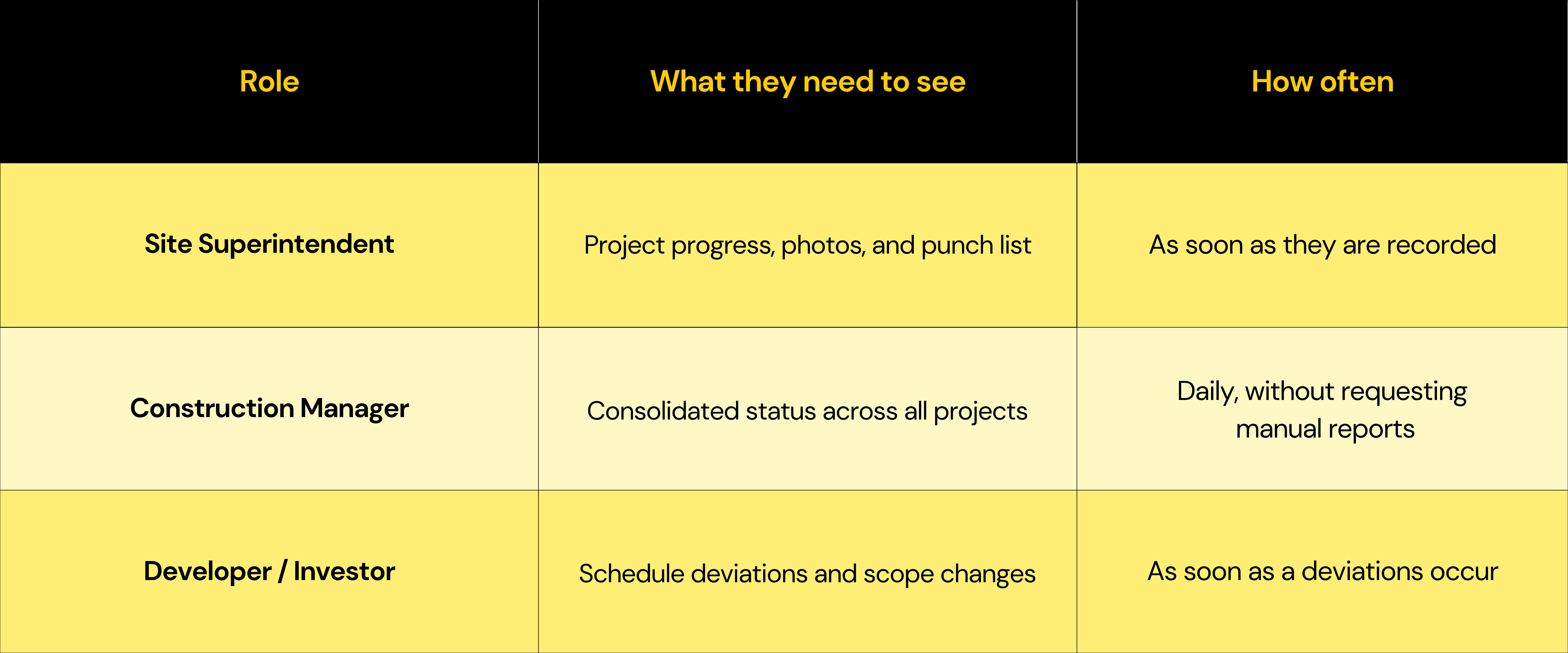
  • The site engineer needs to capture and see data in the moment: a photo, progress, or a field issue.
  • The project manager or construction manager needs to see the consolidated status of several sites without being physically present at any of them.
  • The developer or investor needs to know when something deviates from the schedule, not a monthly report that has already arrived too late.

What the site engineer needs to see, as it happens

The typical symptom: the problem is detected in the field on Monday and reaches the office on Thursday, at best via WhatsApp.

Fieldwire handles checklists and specific field tasks well; Buildpeer goes a step further by making progress reports, geolocated photos, or punch lists visible to the entire team as soon as they are captured, without the information getting trapped on a single person's phone.

This is how information stops being stuck in the field and becomes available to the entire team.

What the project manager needs to see with 5+ sites at the same time

The challenge here isn't the speed of individual data points, but consolidation: seeing the status of multiple projects in a single view, without having to ask each site manager for a report via WhatsApp.

Procore and Autodesk Build handle this well for large-scale operations. However, their implementation is often designed for teams with more administrative structure than the average Mexican construction firm.

Buildpeer addresses that same problem with a more straightforward adoption curve for a director who needs to review all their projects in one place, maintaining that visibility even when the job site lacks a stable internet connection.

What the developer needs to see before delays cost them money

This is the role with the least visibility today: they find out about delays or scope changes at the monthly meeting, by which time it has already impacted project execution.

PlanRadar is strong on inspections with photographic evidence, which is useful for documenting "what happened." What is usually missing is "when I find out," which is where Buildpeer provides an alert as soon as the schedule deviates or the scope changes mid-project, instead of a summary that arrives weeks later.

The obstacle no one mentions: not all "real-time" depends on a good signal

Most platforms of this type assume a constant connection. In the field, that is rarely the case: the signal drops right when there is something to record. Software that only works with good internet doesn't solve "real-time" for the site manager; it just delays it until the signal returns. And that ends up being the same problem by another name.

Transforma la forma en que gestionas tus proyectos de construcción.

Quick framework: what each role needs to see

One platform for all three roles, not three separate tools

The problem isn't that each tool is bad at what it does; it's that the same data ends up living in different places.

The cost isn't having a strong tool for each role: Fieldwire, Procore, and PlanRadar are. The cost is that the site manager captures data in one app, the director consolidates it in another, and the developer receives a summary manually compiled from both.

Buildpeer is built so that the same data captured in the field is what the director sees on their dashboard and what feeds the alert the developer receives, all within a single platform designed from the site manager up.

You can learn more about the platform or see how Luferab stopped relying on manually compiled reports across three different roles.

Conclusion

If your problem is that the site manager, the director, and the developer are all looking at different versions of the same project, the next step is to connect that information into a single workflow.

Book a demo and see how to achieve this in your operations.

Preguntas Frecuentes

Why do the site manager and the director need different things from "real-time" data?

Because they are solving different problems: the site manager needs to capture data quickly, while the director needs to consolidate it without having to request reports. Software designed for only one of them leaves the other behind.

How does a developer find out about a delay before it affects the project?

Through an alert linked to schedule deviations, not through a monthly report compiled after the impact has already occurred.

Is a management dashboard useful if field data arrives late?

No. A dashboard is only useful if the data it consolidates is captured at the precise moment; if the site manager reports it days later, the dashboard only displays outdated information in a different format.

What happens if the construction site doesn't have a good internet connection?

It depends on the software. Buildpeer synchronizes automatically as soon as there is a signal thanks to its Offline Mode; it is worth confirming this with any provider if your site has unstable connectivity.

Is it worth having a different tool for each role?

It works as long as you only have one project. When scaling, maintaining separate tools for each role usually creates the same problem you were trying to solve: information that isn't connected between the person capturing it and the person who needs to see it.

Transform your construction projects
check
Centralize information management
check
Automate key processes
check
Accelerate the growth of your company
Contact Sales
Transform your construction projects with Buildpeer, the intuitive platform that centralizes information management.

During our personalized Buildpeer demo, you will be able to:

Buildpeer is the construction platform built for real-world operations in LATAM. Easy to use and easy to adopt.
Visualize how Buildpeer acts as a single source of truth for your entire team.
We'll show specific workflows based on your use case.
We conclude with a suggested implementation roadmap tailored to your operations, including estimated timelines and benefits.
CONSTRUCTION MANAGEMENT PLATFORM

Discover the power of Buildpeer

During our personalized demo of Buildpeer will allow you to:

Buildpeer is the construction platform built for real-world operations in LATAM. Easy to use and easy to adopt.
See how Buildpeer acts as a single source of truth for your entire team.
We show specific workflows based on your use case.
We finish with a suggested implementation roadmap tailored to your operation, including estimated timelines and benefits.
Schedule your demo and we will show you what your operation can achieve when it has the right tools.
  • Registro y seguimiento de subcontratistas
  • Requisición y recepción de materiales
  • Control de calidad en entregas de obra
  • Control de avance de obra semanal
  • Gestión de planos y cambios de diseño
  • Cierre y entrega de obra al cliente
  • Control de fuerza de trabajo en obra
  • Gestión de no conformidades y retrabajos
  • Coordinación de visitas de supervisión externa
+6,000 users are already operating with Buildpeer
0%
What are you primarily looking to manage?
What is your biggest challenge on the job?