




Subcontractor pay applications look simple: measure what was built, calculate what can be billed and request payment. But between that calculation and approval, several obstacles can show up.
The missing quantity sheet, the photo that stayed on WhatsApp, the quantity that doesn't match what the resident engineer checked, or the Excel file someone corrected without telling anyone.
And when that happens with several subcontractors at the same time, staying in control becomes a job of its own.
In this article we'll look at how a pay application is put together, what it needs to get approved and how Buildpeer's new Contracts module helps run that process in one place.
How is a pay application prepared, step by step?
A pay application isn't just filling in quantities in Excel. Before billing, you have to prove what was built, how much was built and how it was calculated.
In unit-price contracts, the process usually follows these steps:
1. It all starts with the contract. The schedule of values defines which work was contracted, its units of measure, the planned quantities and the price per unit. That is the basis for every pay application, along with any changes approved during the project.
2. Then the completed work is measured. The contractor or subcontractor identifies the work done during the period and quantifies it. It isn't about guessing how much progress was made, but about measuring what can actually be proven.
3. Those quantities need backup: the quantity sheets. This is where the measurements and calculations behind each quantity are recorded. For example, if 280 m² of paving were completed, the quantity sheet should show where that area comes from and which section it belongs to.
4. The evidence is gathered. Photos, sketches, progress reports and quality records, when applicable, help prove the work was done.
5. Now the application is put together. With quantities backed up, amounts are calculated using the approved unit prices. Previous billing, cumulative totals and what remains are also checked.
6. Then comes the review. The resident engineer or supervisor checks quantities in the field, while cost control reviews items, prices and amounts. If something doesn't match, it gets cleared up before the application can be approved.
7. Finally, payment is processed. Once approved, invoicing and payment follow, with advance recovery, taxes and any other adjustments the contract requires.
It is also worth checking how pay applications relate to progress against the construction schedule. Physical and financial progress don't always match, but understanding the difference helps spot possible variances.
What should a pay application include so it gets reviewed without back and forth?
Imagine a subcontractor submits a pay application for 120 meters of installed pipe.
The quantity may be right, but the resident engineer needs to know where it was installed, how it was measured and whether it matches the contracted item. If all of that has to be requested separately, the review starts to drag.
That's why a well-prepared pay application should include project, contractor and period details; items with their units and prices; quantities for the period and to date; and the quantity sheets that back up those quantities.
On top of that come the photos, sketches and other evidence needed, plus a cover sheet that brings together amounts and applicable adjustments.
The idea is that whoever reviews it can follow the math without having to rebuild it.
When the documentation is complete, it's easier to spot differences and resolve them while the work is still fresh. The construction supervisor checklist can also serve as a reference for verifying completed work.
Who is involved and what does each person own?
A pay application can go through several people before it becomes a payment. And although responsibilities vary from company to company, the path is usually similar.
First, the contractor or subcontractor prepares the quantities and gathers the quantity sheets and evidence.
Next, the resident engineer or supervisor checks that the work was actually done and that the quantities match what is in the field.
Cost control confirms that items, prices and amounts are correct. With those reviews complete, the authorized approver can give the final sign-off.
From there, administration or finance continues with the invoice and payment tracking.
The problem shows up when a comment gets stuck between two teams or nobody knows who should take the next step.
That's why a site with real control doesn't depend only on having the information, but on everyone knowing what to review and when it's their turn.
Where do pay applications get stuck?
Think of a subcontractor who sends their pay application in Excel. The resident engineer checks some quantities and sends the file back with comments. Meanwhile, cost control works on an older version.
Then a missing quantity sheet turns up, a photo sent on WhatsApp, and a correction that never made it into the latest file.
None of these problems necessarily means the work was done wrong. But they can delay approval.
Something similar happens when cumulative quantities aren't up to date. If an item had 420 meters contracted and 300 had already been billed, 120 meters remain under the current quantities. Any additional quantity needs to be reviewed and, when applicable, formalized through a contract change.
Then there are the pay applications that simply sit waiting. The subcontractor thinks the resident engineer has it, the resident engineer thinks it's with cost control, and finance still hasn't received the approval.
The challenge isn't only calculating correctly. It's keeping the same information available to everyone involved in the process.
And the more contracts and subcontractors a contractor manages, the more that control matters.
Excel by email vs. a platform: before and after
Excel has been part of contractors' work for years, and it is still useful for preparing schedules of values, quantity sheets and controls.
The problem isn't using it, but relying on several files to coordinate a process that involves different people.
With Buildpeer's new Contracts module, the schedule of values can still start in Excel, but pay applications, their evidence and their reviews are managed inside the platform.
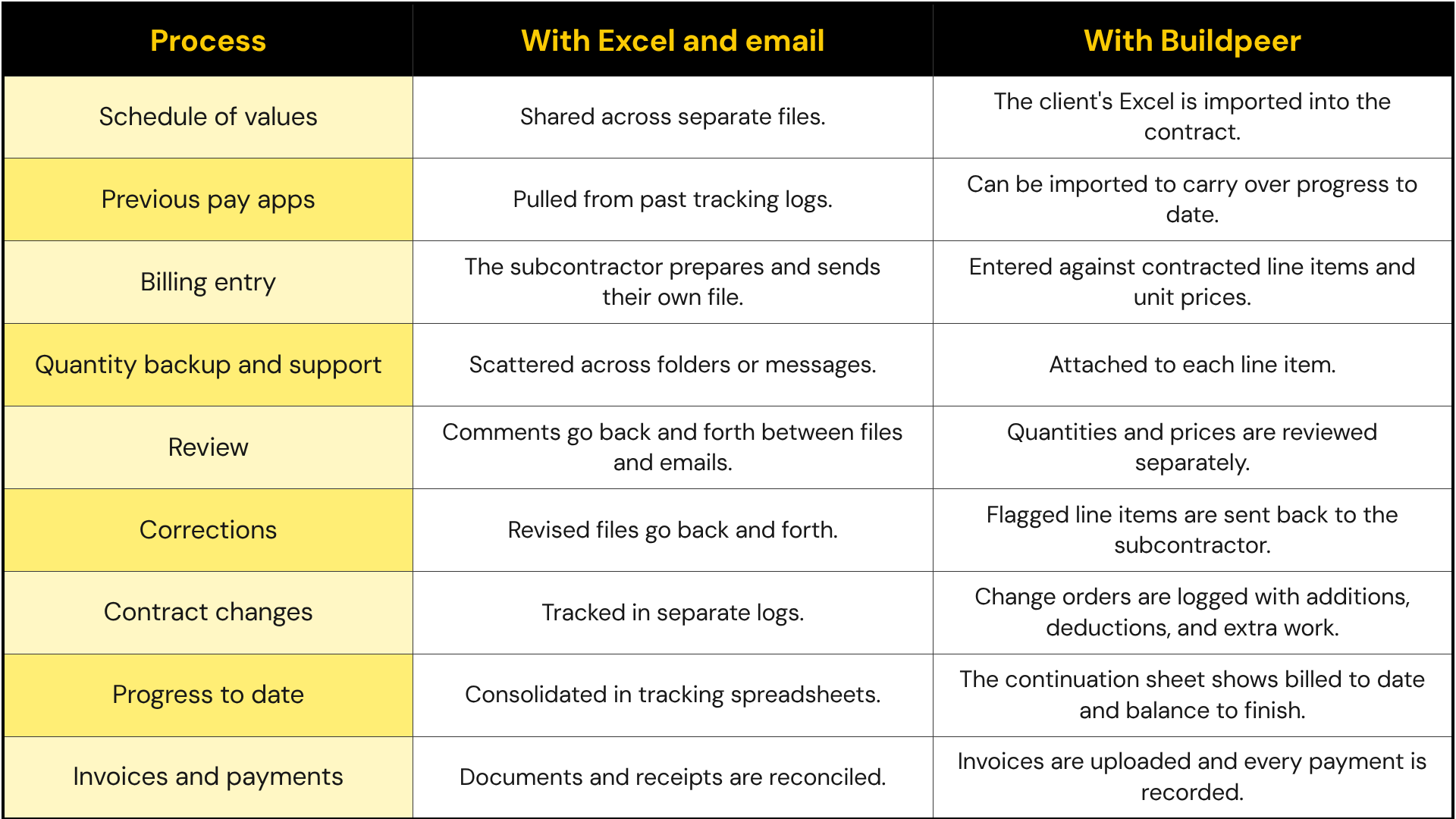
The difference is that the contract, the quantities, the evidence and the review decisions stay connected.
If you want to go deeper into this change, see the Buildpeer vs. Excel comparison.